
How to transcribe a recorded meeting
- Save the meeting recording as a file: Zoom, Google Meet and Teams recordings are MP4 or M4A; a phone or recorder gives M4A, MP3 or WAV.
- Choose it above, pick the spoken language and, if you know it, the number of speakers.
- Rename the speakers, fix names and terms, and play from any timestamp to check a passage.
- Export TXT for meeting notes, Markdown with timestamps and chapters, or SRT subtitles.
Example: a two-person recording with speaker labels
We transcribed our sample interview (MP3, 4:49, two people, a scripted recording made for this site) in Chrome on a laptop, with the free Fast model and the number of speakers set to 2. Speakers were told apart on the device. The text below is unedited: it wrote “flower” for “flour” and “kept a life” for “kept alive”, the kind of slip you fix in the editor, or avoid with the larger cloud model.
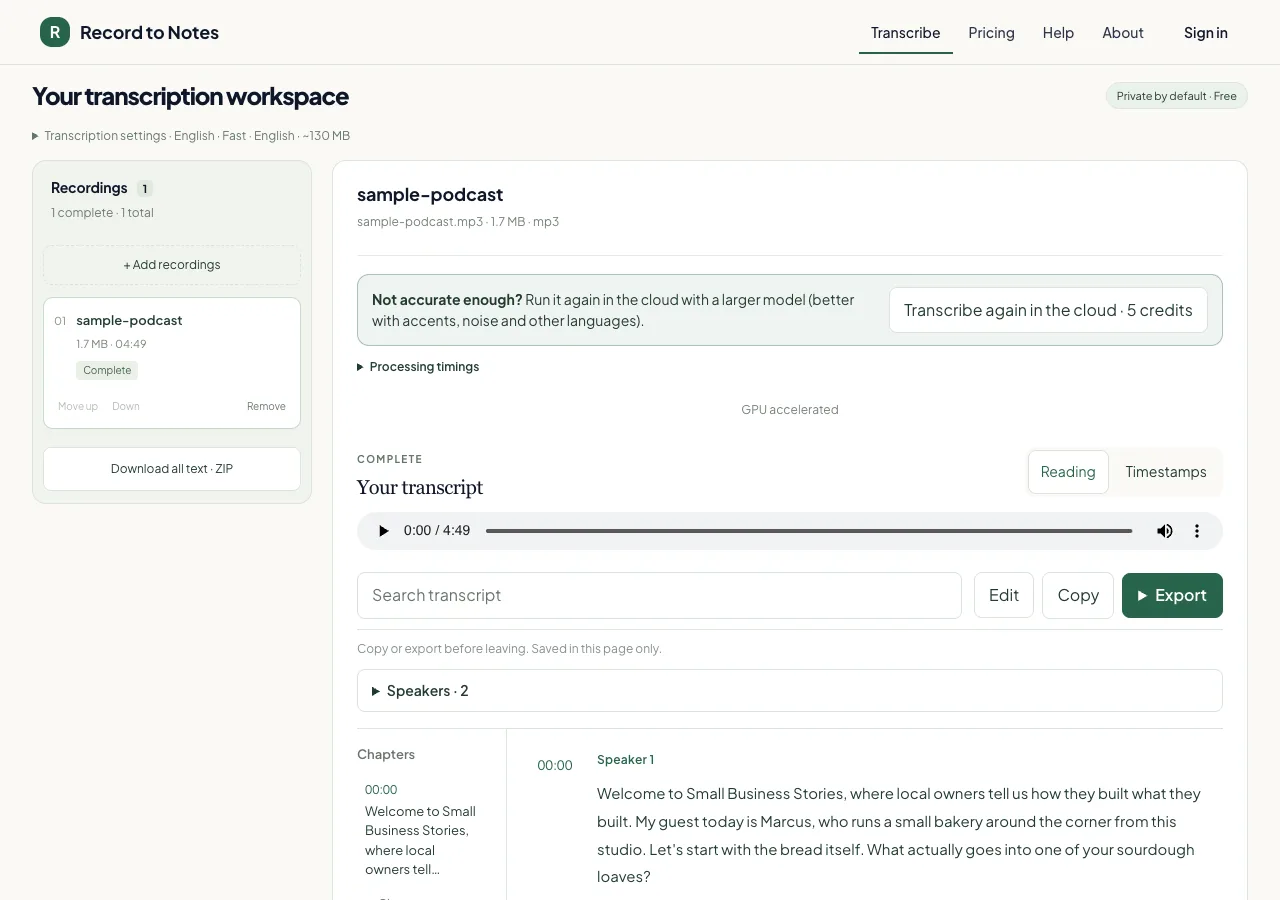
Speaker 1: Welcome to Small Business Stories, where local owners tell us how they built what they built. My guest today is Marcus, who runs a small bakery around the corner from this studio. Let's start with the bread itself. What actually goes into one of your sourdough loaves?

Speaker 2: Every loaf begins with a sourdough starter that I have kept a life for over a decade. The starter is just flour and water that wild yeast has turned sour and bubbly. Beyond the starter there is only flour, water, and a pinch of salt in the dough.

Speaker 1: Which flour goes into the dough and does the choice really matter?

Speaker 2: I use a stone ground wheat flour from a small mill north of the city. Fresh flour carries far more flavor into the crumb than flower that has gone still in a sack. I blend in a little rye flower because rye speeds up the fermentation and darkens the crust.
What you get
- The full transcript, with speaker labels you can rename.
- Timestamps that play the recording from that point, and search within the transcript.
- Chapters for long recordings, kept in the Markdown export.
Noisy rooms and many voices
The free model on your device works best with clear audio. For crosstalk, accents or a noisy room, paid cloud transcription uses Whisper large-v3 turbo, a much larger model; it costs 1 credit per minute. See pricing.